Tell your story in your own words

A text block with a heading, icon and font settings — so your page says more than just links.

Free Plus

Links in bio are sometimes not enough — sometimes you need to explain who you are and what you offer. Choko.Link's text block gives you room for a short promo announcement, working conditions, an important notice or any other message. Adjust the color, size and alignment — and the text fits naturally into the overall page design.

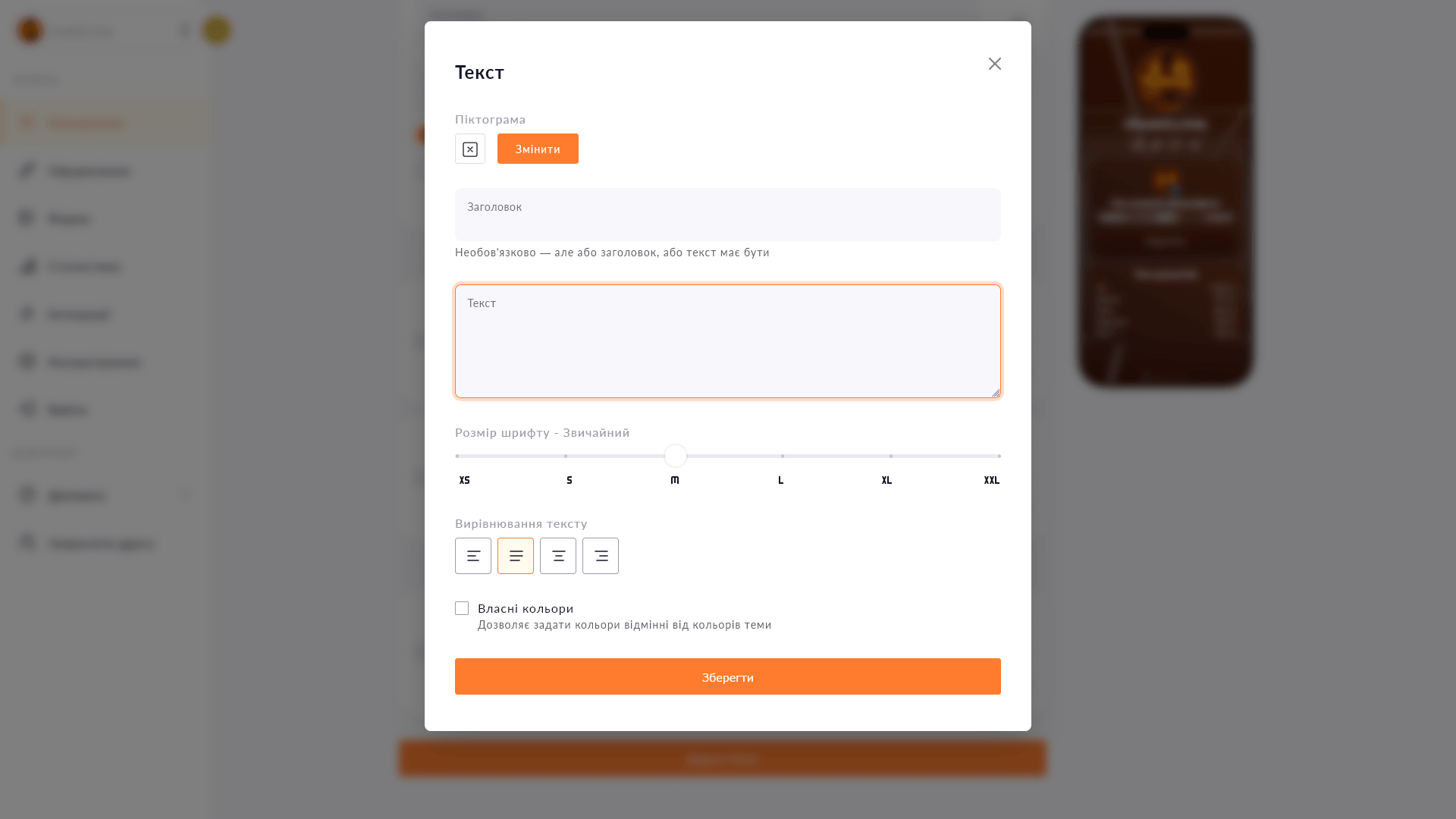
Text block editor in Choko.Link — the most popular multi-link service among Ukrainians
Text block editor in Choko.Link

What the text block can do

  1. Heading + body text
    Fill one or both fields — an h2 heading and a paragraph of text below it.
  2. 5 font sizes
    From very small to very large — pick the size that suits the block's role on the page.
  3. 4 alignment options
    Left, center, right or justified — classic options with no bloat.
  4. Icon next to the heading
    Add an icon from the Tabler library for a visual accent.
  5. Custom colors
    Text color and block fill are yours to choose to match your page's style.
  6. No text length limit
    Short announcement or long description — the field doesn't cut off your content.

How to add a text block

  1. 1. Open your Choko page editor.
  2. 2. Click 'Add block' → choose '✍🏻 Text'.
  3. 3. Enter a heading and/or text, choose size, alignment and colors.
  4. 4. Save — the block appears on your page immediately.

Who it's for

Free to use — try it right now

Create a page

Sign up in 30 seconds • No card needed

Questions & Answers

Available on the Free and Plus plans. Blocks you can add per page: on the Free plan — up to 5, on the Plus plan — up to 25. No, the text block works with plain text. Formatting is handled through the block's own settings (size, alignment, colors). Yes. At least one field — heading or text — must be filled in, but you don't have to fill both.

You might also like

MonoJar (Monobank)

Add a Monobank MonoJar to your Choko page: heading, photo and amount raised — all in one block. Donors see progress without going to the app.

Social media icons

A compact icon row for your social media on a Choko page instead of bulky buttons. Telegram, Instagram, TikTok and dozens more options.

Links block

Create eye-catching buttons with links on your Choko page. Icons, colors, animation — everything in one place.

Block separator

Add spacing, a line, dots or a wave between blocks on your Choko page. Structures content without adding visual noise.

Copy payment details block

Add a card number or IBAN to your Choko page with a 'Copy' button. One tap — and the details are in the clipboard.

Lead collection form

Collect names, phone numbers and emails directly from your Choko page. Export to CSV, send to a Telegram chat and integrate with CRM.