Your bio page — on your website too

A floating button in the corner of your site opens the Choko page as a popup. Site visitors see all your links and contacts without going to another page.

Plus Free

Website visitors don't always know where to find your social media, contacts or Telegram. The Choko.Link widget solves that: a small floating button in the corner — and one click opens your Choko page right over the site. No hunting for contacts in the footer or header — everything is right there.

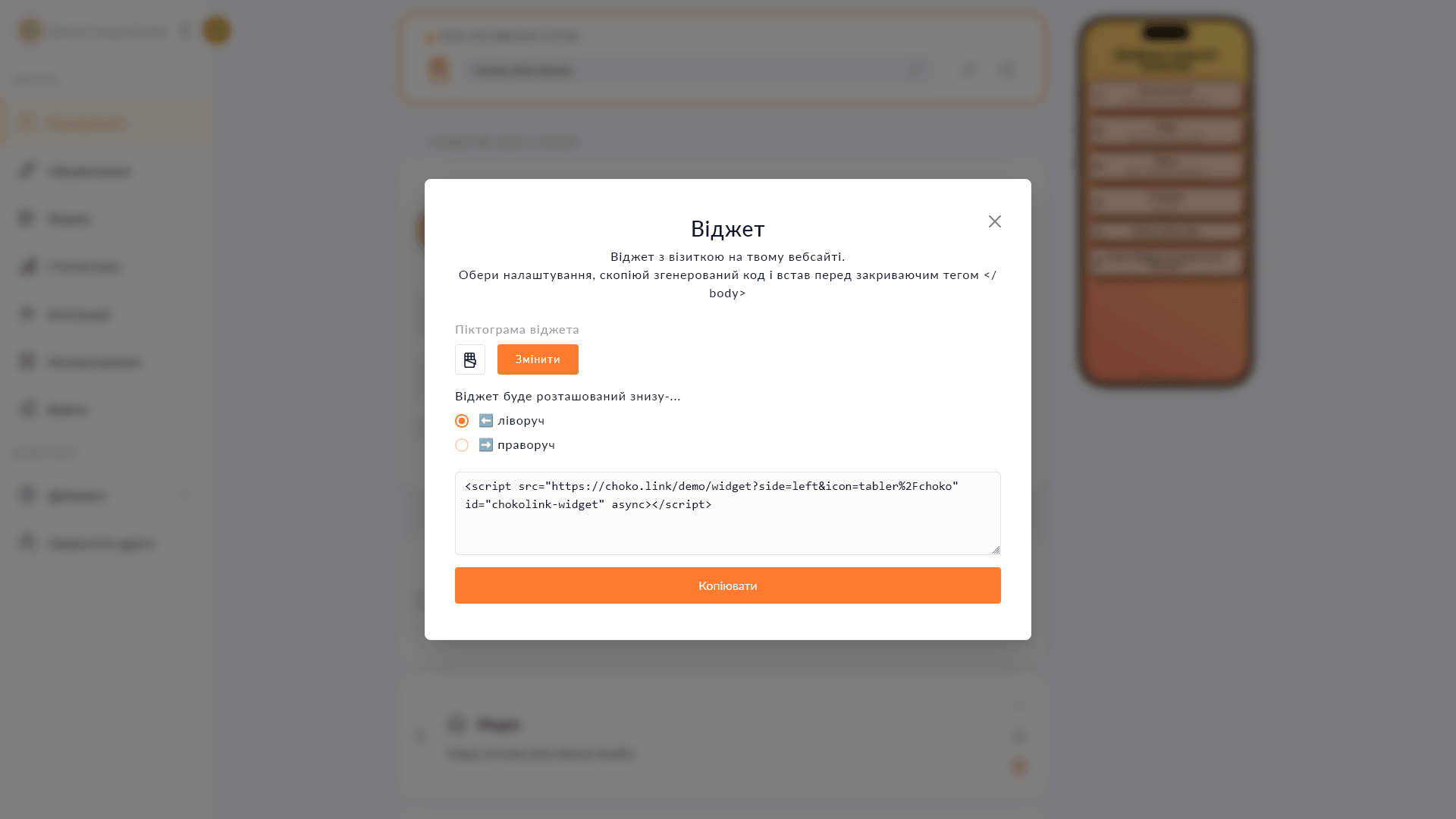
Copying the widget embed code in the Choko.Link dashboard
Check the bottom-right corner

What the website widget can do

  1. Floating button
    The button is fixed in the corner and visible at any scroll position.
  2. Iframe popup
    A click opens your Choko page right over the site — no navigation away.
  3. Simple installation
    Copy one line of code and paste it into the site's HTML — done.
  4. Always current content
    The page in the popup always shows the latest content — updates in Choko.Link are reflected immediately.
  5. Mobile-friendly
    The popup displays correctly on both desktop and mobile.

How to install the widget on your site

  1. 1. Make sure you have an active Plus plan.
  2. 2. Open 'Content' → 'Your link', tap 'Share' and choose 'Widget'.
  3. 3. Copy the embed code.
  4. 4. Paste it into your site's HTML before </body> — the widget is active immediately.

Who it's for

Try Plus — and unlock this feature

Start for free, upgrade whenever you need more.

Create a page for free

Sign up in 30 seconds • No card needed

Questions & Answers

Available on the Plus plan. Yes — the code is standard HTML and works with any builder or CMS that allows custom HTML insertion. No — the widget script loads asynchronously and doesn't block the main site content from rendering.

You might also like

Submissions to Telegram

Connect a Telegram chat to the Choko.Link lead form. Every submission arrives in Telegram instantly — no dashboard visits, no CSV.

Submissions to CRM

Automatically send Choko.Link form submissions to KeepinCRM, KeyCRM or SalesDrive. Feature planned for the Pro plan.

Calendly booking form

Embed a Calendly booking form directly on your Choko page. Clients pick a slot without leaving your bio — no back-and-forth, no DMs.

Click analytics

Link click charts, page views and visitor geo-analytics. 7 days on Free, 31 days on Plus. CSV export.

Custom subdomain

Choose a short subdomain for your Choko page: username.chkl.ink, username.otut.link or username.osyo.link. Available on Plus.

TikTok Pixel

Connect TikTok Pixel to your Choko page. Send views and clicks directly to TikTok Ads Manager via a simple Pixel ID.