A font that speaks before you read

Over ten typefaces for headings and body text — from serious to playful. Typography that amplifies your page's style.

Free — 3/12 Plus — 12/12

A font is the first thing the brain processes before reading actual words: reserved, lively, formal or friendly. Choko.Link offers a curated font selection — separately for headings and body text — so your typography matches your page's character instead of being 'that default font'.

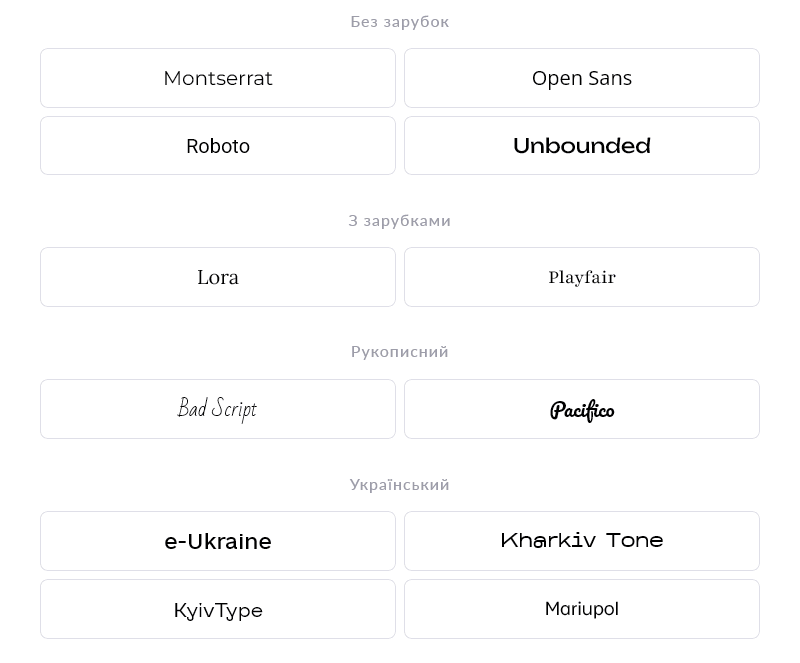
Font list for Choko pages in Choko.Link — the best link-in-bio for Ukrainian brands and bloggers
Font list for Choko pages in Choko.Link

How fonts work

  1. Heading font
    Separate for the name and second-level headings — the most prominent element.
  2. Body text font
    A separate typeface for descriptions, text blocks and captions.
  3. 10+ options
    From classic serifs to modern and handwritten typefaces in the selection.
  4. Full Cyrillic support
    Every font in the catalog has complete, beautiful Ukrainian alphabet support.
  5. Compatible with all blocks
    The chosen font applies consistently to all text across the page.
  6. No speed impact
    Fonts load optimized and don't slow down page opening.

How to change the font

  1. 1. Open your Choko page editor.
  2. 2. Go to 'Design' → 'Text'.
  3. 3. Choose a typeface for the heading and one for the body text.
  4. 4. Save — the font applies to your page immediately.

Who it's for

Free to use — try it right now

Create a page

Sign up in 30 seconds • No card needed

Questions & Answers

Free3 of 12 options, Plus12 of 12 options. Not currently. Choko.Link offers a curated selection of web-optimized typefaces. Custom fonts are not supported. Yes — all fonts are served via Google Fonts and display correctly on Android, iOS and any browser.

You might also like

Background image

Set your own photo as the background of your Choko page. A unique look that expresses your brand — available on the Plus plan.

Background video

Add a YouTube or Vimeo video as the background of your Choko page. A living visual style for your brand, music, venue or portfolio — available on Plus.

Animated background

Add a dynamic background to your Choko page: waves, rays, bubbles, squares, Tron or grain. A live effect with no code.

Button styles

Customize buttons on your Choko page: solid fill or outline, corner radius, shadow and colors. Each button individually.

Hero avatar

The hero avatar spans the full container width on your Choko page and blends smoothly into the background. A striking first impression for your bio.

MonoJar (Monobank)

Add a Monobank MonoJar to your Choko page: heading, photo and amount raised — all in one block. Donors see progress without going to the app.